CSV, JSONs, EDIs and APIs. Give our integration agent whatever data format you have and a few moments later you'll have a working integration. Reliable and in production.
This once took a team weeks. An engineer opened each file, saw that it was structured in a different way, mapped each field to their way of working, ran tests, found edge cases, fixed them. Then did it all again, for each customer.
For large enterprises, you can absorb that investment. But to scale across the long tail of logistics providers, you can't. So, systems never talk, which is why much of the work is still done by hand. Either you don't adopt new software or your team becomes the integration layer.
At Guided, we didn't accept this trade-off. Our agents can start with an order in your TMS and end with an email. Or, they can start with an email and end in your TMS. This means our agents operate within your existing tools not outside of them.
The interesting part isn't that Claude can write the parsing code. The interesting part is what we had to build around Claude before it could do so reliably. This is harness engineering: we provide the agent with sample inputs, expected outputs, SQL substrate, a test runner, and a tight feedback loop. So, we build the tools that then build the integrations.
This post is about how we built it, and what we learned about the shape of the environment an agent needs to actually do the work.
The business problem: fragmented software makes every integration custom
Most actors in the logistics industry speak the same language: order numbers, contact details, pickup locations, delivery date, ETA.
They may speak the same language but, when you observe a little closer, you find that it's a different dialect.
Most use different TMS's. A TMS is the software a logistics company uses to plan and monitor shipments. This means different formats: API calls, daily CSV emails sent via attachments, Excel exports. This also means different column names, different statuses.
Even when two customers use the same TMS, they often do not fill in the data the same way. One customer uses three statuses, while another has five. A third writes the status in the description and ignores the status tab altogether.
So the question became: how do we make building integrations a breeze? If we want to support small customers, building a new integration has to be fast, reliable, and owned by Customer Success.
It's a data transformation problem
"A problem well stated is a problem half solved" — Charles Kettering
Before jumping into a solution, we should define clearly the problem at hand.
From the previous section, it should be clear that a big pain point is the diversity of inputs. They can vary on several axis:
- Source: how do we receive the files? Files could be attachments in a scheduled email, uploaded files on an SFTP server
- Shape: what kind of files do we receive? It could be a single Excel file, a zip of several CSV files
- Content: what do the files contain? Customers might have filled in data differently in their systems
For our internal systems, Guided has its own way to represent this data.
Therefore, the problem to solve is to transform a variety of sources and data formats into a single output format.
What we learned from running agents in production
From our experience running agentic systems in production, and leveraging them in our development workflow, we have a few takeaways:
- Clear process: Agents do extremely well at following clear step-by-step instructions
- Feedback loop: Agent performance can increase dramatically when they can have a loop where they try something, see the result, refine their approach
- Ground truth feedback: The feedback loop is even stronger when the output is clearly right or wrong
- Randomness: An agent is inherently probabilistic. If you need something to happen reliably, use code.
- Flexibility: The strength of an agent is to adapt to unforeseen cases.
- Pattern matching: LLMs, by design, are made for pattern matching. It shouldn't come as a surprise that agents can outperform humans (speed, reliability) at pattern matching, e.g. checking that a list of fields is present
We should leverage those learnings to inform our architecture decision.
Leveraging agents where it makes sense
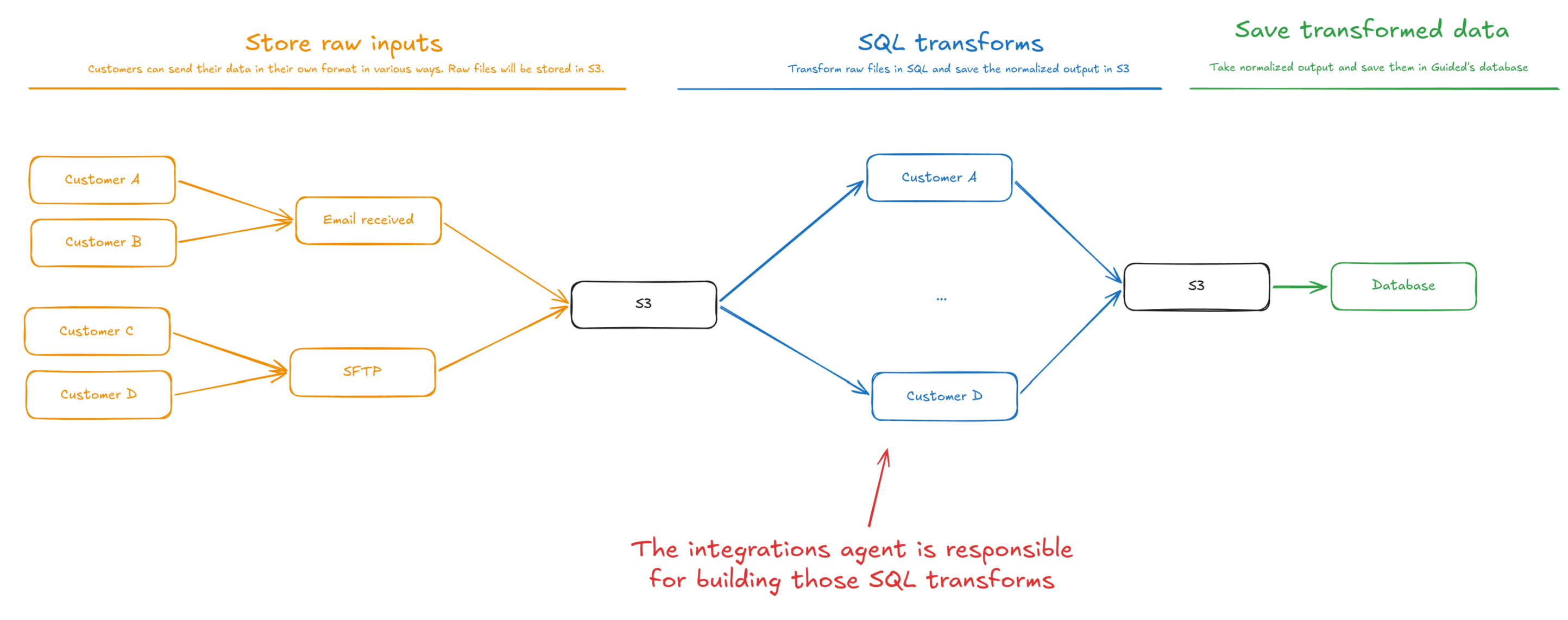
Our architecture aims at leveraging the agent where customer-specific judgement is required, and leave customer-agnostic parts deterministic.
The first thing to notice is the cardinality of input kinds:
- There are only a few sources: email attachments, SFTP
- Each customer has a different way to fill in data into their systems
There is a small, limited set of sources. We can design our sources to be customer independent, in which case we can build one deterministic handler per source type. No agents involved. We just receive raw files and store them as is in Object Storage (e.g. S3). That's the orange part on the diagram.
Once customer data has been transformed into a normalized output, saving to the database can also be done deterministically. Nothing customer specific, no need for agents. This is the green part.
It leaves us with one step where the agent will step in, which is purely customer specific: transforming the customer's raw input files into Guided's normalized data format.
Harness engineering: setting up the agent for success
The process is now owned by Customer Success and is as follows:
- Sample inputs: Customer Success asks the customer for sample files. This would have happened, regardless of whether it's an agent or a human doing the integration work.
- Expected output: Customer Success takes the input files, their favorite tool (e.g. Excel), and generates the expected output by hand.
Now that we have the raw inputs, and the ground truth, we can let the agent iterate freely.
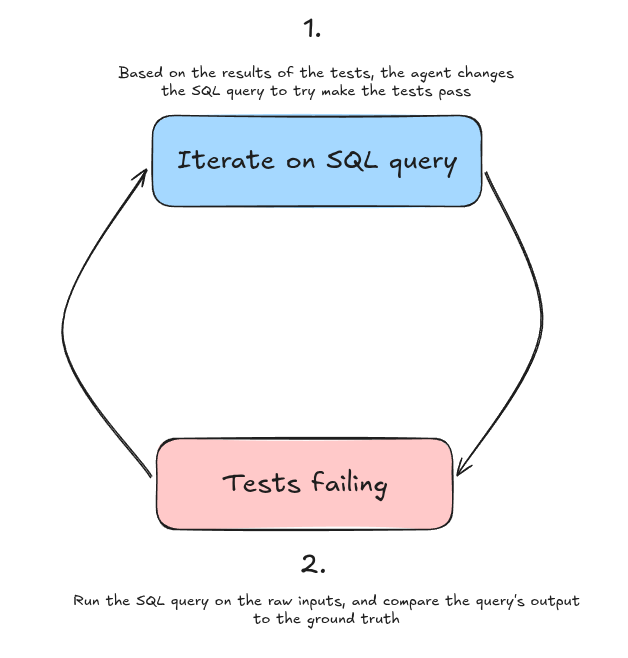
The agent iterates on a strong feedback loop where it:
- Writes a SQL query (step 1 at the top in the diagram)
- Runs the tests against the SQL query (step 2, at the bottom)
- Based on the results of the tests (what worked, what didn't), the agent can modify the SQL query (step 1)
- Once the query has been modified, the harness re-runs the tests (step 2)
- Rinse and repeat until all tests pass.
Apart from the strong harness, the agent also has precise guidelines about how to approach the problem. For instance, it is asked to look for edge cases, to ask a human follow-up questions if needed.
Note: we don't use any database, we use DuckDB which has been made specifically for data wrangling. It provides nice utilities (e.g. read from excel files) that ease the work of agents. It also requires less infrastructure (it's a simple file).
The integrations agent in production
In practice, the agent can spin up an integration in ~10 minutes when it was taking days before.
We also noticed the agent was particularly good at spotting edge cases, which humans wouldn't spot when you receive a 4000 lines sample file!
Also, if an error is flagged in production, such as an edge case that wasn't present in sample files, Customer Success can spin up an agent that writes a PR automatically.
Conclusion
Some tasks were previously not economically viable. Thanks to AI, some of those tasks become economically viable, such as building custom integrations for non-enterprise deal sizes.
This is not a magical solution though, one should invest in harness engineering to turn it into a success.